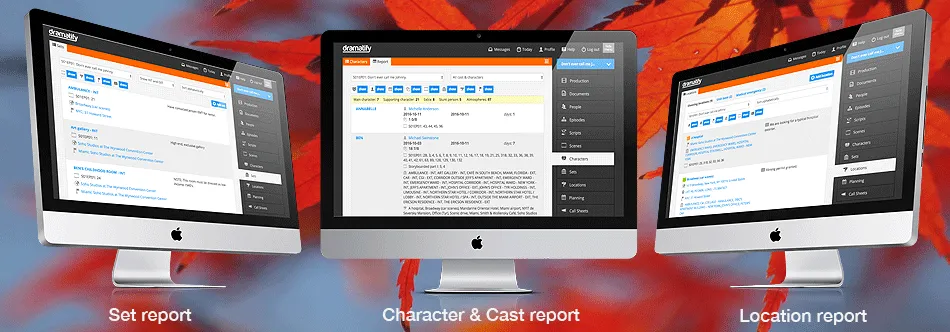
Useful reports to keep the production on track!
[et_pb_section fb_built=“1” admin_label=“section” _builder_version=“4.16” global_colors_info=“{}”][et_pb_row admin_label=“row” _builder_version=“4.16” global_colors_info=“{}”][et_pb_column type=“4_4” _builder_version=“4.16” custom_padding=“|||” global_colors_info=“{}” custom_padding__hover=“|||”][et_pb_text _builder_version=“4.16” background_size=“initial” background_position=“top_left” background_repeat=“repeat” max_width=“960px” custom_margin=“0px|0px|0px|0px” custom_padding=“0px|0px|0px|0px” z_index_tablet=“500” custom_css_main_element=“background-color: #fff;” text_text_shadow_horizontal_length_tablet=“0px” text_text_shadow_vertical_length_tablet=“0px” text_text_shadow_blur_strength_tablet=“1px” link_text_shadow_horizontal_length_tablet=“0px” link_text_shadow_vertical_length_tablet=“0px” link_text_shadow_blur_strength_tablet=“1px” ul_text_shadow_horizontal_length_tablet=“0px” ul_text_shadow_vertical_length_tablet=“0px” ul_text_shadow_blur_strength_tablet=“1px” ol_text_shadow_horizontal_length_tablet=“0px” ol_text_shadow_vertical_length_tablet=“0px” ol_text_shadow_blur_strength_tablet=“1px” quote_text_shadow_horizontal_length_tablet=“0px” quote_text_shadow_vertical_length_tablet=“0px” quote_text_shadow_blur_strength_tablet=“1px” header_text_shadow_horizontal_length_tablet=“0px” header_text_shadow_vertical_length_tablet=“0px” header_text_shadow_blur_strength_tablet=“1px” header_2_text_shadow_horizontal_length_tablet=“0px” header_2_text_shadow_vertical_length_tablet=“0px” header_2_text_shadow_blur_strength_tablet=“1px” header_3_text_shadow_horizontal_length_tablet=“0px” header_3_text_shadow_vertical_length_tablet=“0px” header_3_text_shadow_blur_strength_tablet=“1px” header_4_text_shadow_horizontal_length_tablet=“0px” header_4_text_shadow_vertical_length_tablet=“0px” header_4_text_shadow_blur_strength_tablet=“1px” header_5_text_shadow_horizontal_length_tablet=“0px” header_5_text_shadow_vertical_length_tablet=“0px” header_5_text_shadow_blur_strength_tablet=“1px” header_6_text_shadow_horizontal_length_tablet=“0px” header_6_text_shadow_vertical_length_tablet=“0px” header_6_text_shadow_blur_strength_tablet=“1px” box_shadow_horizontal_tablet=“0px” box_shadow_vertical_tablet=“0px” box_shadow_blur_tablet=“40px” box_shadow_spread_tablet=“0px” global_colors_info=“{}”]
Dramatify users asked for more detailed reports, and here they are! Each is easy to customise with a click or two if you want to print or PDF reports and send to others.
The Character and Cast report
The Character and Cast report contain all important information about a character and it’s cast talent:
- Working period: Start date, finishing date, number of days
- Number of pages
- Scenes
- Episodes
- Sets
- Locations
- Unit bases
As you see on top of the image, you can hide any information with a click, if you want to customise and send a report to a colleague. Underneath the show/hide buttons, you also go the stats for the number of characters in the various cast categories. If you only want to view a specific character category, like main characters or stunt persons, you filter that with a dropdown menu.
Combine the Character & Cast report with the awesome flexibility of Dramatify’s scene list, and you can very easily dig deep and get exactly the character and cast information you need.
The set report & list
While the Character & Cast report is a specific report, with Sets and Locations, we have simply extended the list functionality to give you all important information at a glance.
- Scenes
- Location with a map link
- Unit base with a map link
- Notes
You can also sort the setlist report on:
- Episodes
- INT, EXT, INT/EXT, EXT/INT
- Alphabetically by set name
- Production day
- Location
The location list and report
The location list report works pretty much the same way as the setlist report. We have three types of locations:
- Shooting locations
- Unit base
- Medical emergency
For each shooting location you see:
- Location status (none, red, yellow, green)
- Street address with a map link
- GPS coordinates with a map link
- Sets
- Unit base
- Episodes & scenes
- Notes
You can also group the shooting locations on production day in the header dropdown.
Happy reporting!
[/et_pb_text][et_pb_social_media_follow follow_button=“on” _builder_version=“4.16” border_radii=“on|100%|100%|100%|100%” link_shape=“circle” global_colors_info=“{}”][et_pb_social_media_follow_network social_network=“instagram” url=“https://instagram.com/dramatify” _builder_version=“4.16” background_color=“#517fa4” bg_color=“#517fa4” global_colors_info=“{}” follow_button=“on” url_new_window=“on”] Instagram [/et_pb_social_media_follow_network][et_pb_social_media_follow_network social_network=“facebook” url=“http://facebook.com/dramatify” _builder_version=“4.16” background_color=“#3b5998” bg_color=“#3b5998” global_colors_info=“{}” follow_button=“on” url_new_window=“on”] Facebook [/et_pb_social_media_follow_network][et_pb_social_media_follow_network social_network=“twitter” url=“http://twitter.com/dramatify” _builder_version=“4.22.2” background_color=“#000000” bg_color=“#00aced” global_colors_info=“{}” follow_button=“on” url_new_window=“on”] Twitter [/et_pb_social_media_follow_network][et_pb_social_media_follow_network social_network=“vimeo” url=“http://vimeo.com/dramatify” _builder_version=“4.16” background_color=“#45bbff” bg_color=“#45bbff” global_colors_info=“{}” follow_button=“on” url_new_window=“on”] Vimeo [/et_pb_social_media_follow_network][et_pb_social_media_follow_network social_network=“youtube” url=“http://youtube.com/dramatifyTV” _builder_version=“4.16” background_color=“#a82400” bg_color=“#a82400” global_colors_info=“{}” follow_button=“on” url_new_window=“on”] Youtube [/et_pb_social_media_follow_network][/et_pb_social_media_follow][et_pb_comments show_avatar=“off” show_count=“off” _builder_version=“4.16” border_style=“solid” button_letter_spacing_hover=“0” global_colors_info=“{}” button_text_size__hover_enabled=“off” button_text_size__hover=“null” button_one_text_size__hover_enabled=“off” button_one_text_size__hover=“null” button_two_text_size__hover_enabled=“off” button_two_text_size__hover=“null” button_text_color__hover_enabled=“off” button_text_color__hover=“null” button_one_text_color__hover_enabled=“off” button_one_text_color__hover=“null” button_two_text_color__hover_enabled=“off” button_two_text_color__hover=“null” button_border_width__hover_enabled=“off” button_border_width__hover=“null” button_one_border_width__hover_enabled=“off” button_one_border_width__hover=“null” button_two_border_width__hover_enabled=“off” button_two_border_width__hover=“null” button_border_color__hover_enabled=“off” button_border_color__hover=“null” button_one_border_color__hover_enabled=“off” button_one_border_color__hover=“null” button_two_border_color__hover_enabled=“off” button_two_border_color__hover=“null” button_border_radius__hover_enabled=“off” button_border_radius__hover=“null” button_one_border_radius__hover_enabled=“off” button_one_border_radius__hover=“null” button_two_border_radius__hover_enabled=“off” button_two_border_radius__hover=“null” button_letter_spacing__hover_enabled=“on” button_letter_spacing__hover=“0” button_one_letter_spacing__hover_enabled=“off” button_one_letter_spacing__hover=“null” button_two_letter_spacing__hover_enabled=“off” button_two_letter_spacing__hover=“null” button_bg_color__hover_enabled=“off” button_bg_color__hover=“null” button_one_bg_color__hover_enabled=“off” button_one_bg_color__hover=“null” button_two_bg_color__hover_enabled=“off” button_two_bg_color__hover=“null”][/et_pb_comments][/et_pb_column][/et_pb_row][/et_pb_section]